CBAM is geen label — het is een kostenfactor. CBAM is not a label — it's a cost driver.
EU-importeurs van CO₂-intensieve goederen moeten CBAM-certificaten kopen die overeenkomen met de CO₂-uitstoot bij productie. De app detecteert de plicht automatisch en berekent de kosten op basis van actuele ETS-marktprijzen. EU importers of CO₂-intensive goods must purchase CBAM certificates corresponding to the CO₂ emissions during production. The app automatically detects the obligation and calculates costs based on current ETS market prices.
Welke goederen vallen onder CBAM?Which goods fall under CBAM?
De app controleert automatisch via maatregel-type 775 in TARIC of de specifieke CN8-code CBAM-plichtig is.The app automatically checks via measure type 775 in TARIC whether the specific CN8 code is subject to CBAM.
Broeikasgassen per sectorGreenhouse gases per sector
CBAM dekt niet alleen CO₂ — voor aluminium en kunstmest gelden aanvullende broeikasgassen (Annex I Verordening (EU) 2023/956). De app toont dit als gekleurde badges naast de emissiefactor. Alle waarden zijn uitgedrukt in tCO₂-equivalent (tCO₂e) — de omrekening via GWP-factoren is al verwerkt in de EU Default Values, zodat de berekeningsformule ongewijzigd blijft. CBAM covers not just CO₂ — aluminium and fertilizers have additional greenhouse gases (Annex I of Regulation (EU) 2023/956). The app shows these as coloured badges next to the emission factor. All values are expressed in tCO₂-equivalent (tCO₂e) — the conversion via GWP factors is already included in the EU Default Values, so the calculation formula remains unchanged.
| SectorSector | BroeikasgassenGreenhouse gases | ToelichtingNotes |
|---|---|---|
| Cement | CO₂ | Alleen directe CO₂-uitstoot bij calcineringDirect CO₂ emissions from calcination only |
| Staal & ijzerSteel & iron | CO₂ | Cokesfabricage, sinterprocessen en staalproductieCoke manufacturing, sintering and steelmaking |
| Aluminium | CO₂ PFC | PFC (CF₄ + C₂F₆) vrijkomt bij anode-effect in elektrolyse (Hall-Héroult). GWP: CF₄ = 6.630 × CO₂, C₂F₆ = 11.100 × CO₂.PFC (CF₄ + C₂F₆) released during anode effect in electrolysis (Hall-Héroult). GWP: CF₄ = 6,630 × CO₂, C₂F₆ = 11,100 × CO₂. |
| KunstmestFertilizers | CO₂ N₂O | N₂O vrijkomt bij salpeterzuurproductie (Ostwald-proces). GWP: N₂O = 273 × CO₂.N₂O released during nitric acid production (Ostwald process). GWP: N₂O = 273 × CO₂. |
| ElektriciteitElectricity | CO₂ | Uitstoot bij elektriciteitsopwekkingEmissions from electricity generation |
| WaterstofHydrogen | CO₂ | CO₂ bij stoomreforming (SMR) of elektrolyse met grijze stroomCO₂ from steam methane reforming (SMR) or electrolysis with grey power |
De gekleurde badges (CO₂ / PFC / N₂O) zijn zichtbaar naast de emissiefactor in het CBAM-paneel en in sectie 3 van het compliance rapport. The coloured badges (CO₂ / PFC / N₂O) are visible next to the emission factor in the CBAM panel and in section 3 of the compliance report.
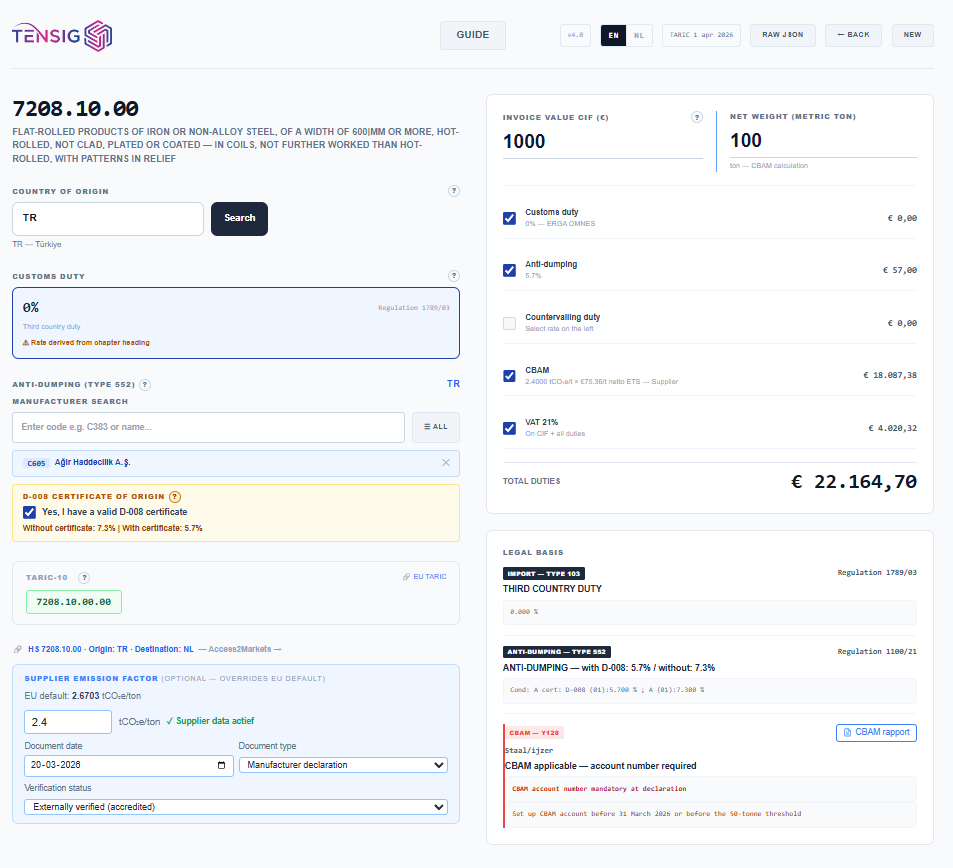
Het CBAM-paneel in de appThe CBAM panel in the app
Drie mogelijke statussenThree possible statuses
Y128
CBAM volledig van toepassingCBAM fully applicable
Certificaatplicht bij aangifte. De app berekent de verwachte CBAM-kosten op basis van emissiefactor × netto ETS-prijs. Het CBAM-accountnummer van de importeur is verplicht bij de douaneaangifte.Certificate obligation at declaration. The app calculates expected CBAM costs based on emission factor × net ETS price. The importer's CBAM account number is mandatory in the customs declaration.
Y137
De minimis vrijstellingDe minimis exemption
Jaarvolume van de importeur voor dit product is onder de 50.000 kg. De drempel geldt per importeur per jaar — meerdere kleine zendingen tellen cumulatief mee. Elektriciteit (2716) en waterstof (2804) hebben geen de minimis-drempel.Importer's annual volume for this product is below 50,000 kg. The threshold applies per importer per year — multiple small shipments count cumulatively. Electricity (2716) and hydrogen (2804) have no de minimis threshold.
Y237
Land vrijgesteld (ETS-equivalent)Country exempt (ETS-equivalent)
Het exporterende land heeft een eigen koolstofbeprijzing die equivalent is aan het EU ETS. Voorbeelden: Noorwegen, IJsland, Liechtenstein, Zwitserland. Geen CBAM-kosten — certificaat Y237 opgeven bij aangifte.The exporting country has its own carbon pricing equivalent to the EU ETS. Examples: Norway, Iceland, Liechtenstein, Switzerland. No CBAM costs — declare certificate Y237 at customs.
De ETS-prijs — dagelijks bijgewerktThe ETS price — updated daily
Elke nacht downloadt de app het officiële EEX Emission Spot Primary Market Auction Report — het dagelijkse veilingrapport van de European Energy Exchange. Dit rapport bevat de resultaten van alle EU ETS-veilingen (EU Primary, Duitsland, Polen). Meerdere veilingen op één dag worden samengevoegd via een volume-gewogen daggemiddelde. Every night the app downloads the official EEX Emission Spot Primary Market Auction Report — the daily auction report of the European Energy Exchange. This report contains the results of all EU ETS auctions (EU Primary, Germany, Poland). Multiple auctions on one day are merged via a volume-weighted daily average.
show_chart Kwartaalgemiddelde — de officiële CBAM-grondslagQuarterly average — the official CBAM basis
De EU-verordening schrijft het volume-gewogen kwartaalgemiddelde voor als prijsbasis. Dagen met meer handelsvolume wegen zwaarder. Dit filtert rustige handelsdagen (feestdagen, vrijdagen) automatisch uit. The EU regulation prescribes the volume-weighted quarterly average as the price basis. Days with more trading volume carry more weight. This automatically filters out quiet trading days (public holidays, Fridays).
timeline Rolling averages — voor prognose en scenarioRolling averages — for forecasting and scenarios
Naast het officiële kwartaalgemiddelde biedt de app voortschrijdende gemiddelden over 7, 14, 30, 60 en 90 handelsdagen. Deze zijn niet de officiële CBAM-grondslag, maar nuttig voor het inschatten van toekomstige kosten bij een veranderende marktprijs. De keuze wordt opgeslagen en automatisch toegepast bij elke nieuwe opvraging. In het rapport wordt een amber waarschuwing getoond als een rolling periode gebruikt wordt, inclusief het exacte datumbereik van de gebruikte veilingdata (begindatum – einddatum). In addition to the official quarterly average, the app offers rolling averages over 7, 14, 30, 60 and 90 trading days. These are not the official CBAM basis, but useful for estimating future costs when market prices change. The choice is saved and automatically applied with each new query. The report shows an amber warning when a rolling period is used, including the exact date range of the auction data used (start date – end date).
| PeriodePeriod | €/tCO₂e | VeilingdagenAuction days | KeuzeSelect |
|---|---|---|---|
| Kwartaalgemiddelde (2026-Q2)Quarterly avg (2026-Q2) | €71,66 | 18 | |
| 7-daags voortschrijdend7-day rolling avg | €71,82 | 5 | |
| 30-daags voortschrijdend30-day rolling avg | €71,67 | 22 | |
| 90-daags voortschrijdend90-day rolling avg | €70,23 | 65 |
De CBAM-berekening stap voor stapThe CBAM calculation step by step
Emissiefactor ophalen (cascade)Retrieve emission factor (cascade)
CN8 + land → CN6 + land → CN4 + land → CN8 + ZZ → CN6 + ZZ → CN4 + ZZ. Uitgedrukt in tCO₂e per ton product. Gepubliceerd door de Europese Commissie (Verordening (EU) 2024/3207).CN8 + country → CN6 + country → CN4 + country → CN8 + ZZ → CN6 + ZZ → CN4 + ZZ. Expressed in tCO₂e per tonne of product. Published by the European Commission (Regulation (EU) 2024/3207).
ETS-veilingprijs ophalenRetrieve ETS auction price
Volume-gewogen kwartaalgemiddelde uit EEX-veilingdata. Dagelijks bijgewerkt. De app toont het kwartaal en het aantal veilingdagen.Volume-weighted quarterly average from EEX auction data. Updated daily. The app shows the quarter and number of auction days.
Aftrek CO₂-prijs herkomstland (Art. 9)Deduct origin country CO₂ price (Art. 9)
Als het exportland een eigen koolstofheffing heeft (maar niet genoeg voor vrijstelling Y237), wordt die afgetrokken. Voor de meeste landen waaronder China geldt € 0,00 aftrek. Netto ETS = max(0, ETS-prijs − CO₂-prijs herkomstland).If the exporting country has its own carbon levy (but not enough for exemption Y237), it is deducted. For most countries including China, the deduction is €0.00. Net ETS = max(0, ETS price − origin country CO₂ price).
Kosten berekenenCalculate costs
CBAM/ton = emissiefactor × netto ETS
Totaal = CBAM/ton × gewicht (ton)
science Leverancier-specifieke emissiefactorSupplier-specific emission factor
Heeft jouw buitenlandse producent een geverifieerde emissiemeting (door een geaccrediteerde verificateur), dan mag je die factor gebruiken in plaats van de EU-default. Dit kan de CBAM-rekening aanzienlijk verlagen. Voer de factor in bij "Supplier emissiefactor (tCO₂e/ton)". Het compliance rapport legt vast: de factor, de meetdatum, het documenttype en de verificatiestatus. If your foreign producer has a verified emission measurement (by an accredited verifier), you may use that factor instead of the EU default. This can significantly reduce the CBAM bill. Enter the factor in "Supplier emission factor (tCO₂e/ton)". The compliance report records: the factor, measurement date, document type and verification status.
CBAM in het totaaloverzichtCBAM in the total overview
CBAM staat buiten de BTW-grondslag. Dit is juridisch correct: CBAM is geen douanerecht maar een separaat certificaatmechanisme onder Verordening (EU) 2023/956. BTW wordt berekend over douanewaarde + douanerechten, niet over CBAM. CBAM is outside the VAT base. This is legally correct: CBAM is not a customs duty but a separate certificate mechanism under Regulation (EU) 2023/956. VAT is calculated on customs value + customs duties, not on CBAM.
Pro-tip: De de minimis-drempel van 50.000 kg geldt per importeur per jaar — niet per zending. Meerdere kleine zendingen van hetzelfde product tellen cumulatief mee. Gebruik het kwartaalgemiddelde voor officiële berekeningen; rolling averages zijn alleen voor prognoses en scenarioanalyse. The de minimis threshold of 50,000 kg applies per importer per year — not per shipment. Multiple small shipments of the same product count cumulatively. Use the quarterly average for official calculations; rolling averages are only for forecasting and scenario analysis.
tag Het NMR-nummerThe NMR number
Het NMR (CBAM Reference Number) is het referentienummer van uw kwartaalaangifte in het EU CBAM-register. Door het NMR in te voeren vóór het opslaan naar de Workspace, wordt de zending direct gekoppeld aan de juiste aangifte. Dit is niet verplicht maar sterk aanbevolen — zonder NMR moet de koppeling later handmatig worden gelegd in de CBAM Workspace. The NMR (CBAM Reference Number) is the reference number of your quarterly declaration in the EU CBAM Registry. By entering the NMR before saving to the Workspace, the shipment is directly linked to the correct declaration. This is not mandatory but strongly recommended — without an NMR, the link must be made manually later in the CBAM Workspace.
format_list_numbered FormaatFormat
26XX00000000000000
26 = jaar van aangifte · XX = ISO-landcode importeur (bijv. NL) · gevolgd door een uniek serienummer 26 = declaration year · XX = ISO country code of importer (e.g. NL) · followed by a unique serial number
find_in_page Waar vind ik het NMR?Where do I find the NMR?
- 1.Log in op het EU CBAM-registerportaal (cbam.ec.europa.eu)Log in to the EU CBAM Registry portal (cbam.ec.europa.eu)
- 2.Ga naar "Mijn kwartaalrapporten" en open het relevante kwartaalGo to "My quarterly reports" and open the relevant quarter
- 3.Het NMR staat bovenaan de aangifte als referentienummerThe NMR appears at the top of the declaration as the reference number
save Opslaan in de CBAM WorkspaceSaving to the CBAM Workspace
De app ondersteunt een volledige end-to-end-flow voor gebruikers met de CBAM Workspace. Niet alle gebruikers hebben de Workspace ingeschakeld — voor tariefopzoekingen en kostprijsberekeningen zijn alle CBAM-velden optioneel. Wil je een zending doorsturen naar de Workspace, dan gelden onderstaande stappen. The app supports a full end-to-end flow for users with the CBAM Workspace enabled. Not all users have the Workspace activated — for tariff lookups and cost calculations all CBAM fields are optional. To forward a shipment to the Workspace, follow the steps below.
CN-8 code & herkomstlandCN-8 code & country of origin
Zoek de CN-8 code op en voer het herkomstland in. De app controleert automatisch of de code CBAM-plichtig is (maatregel-type 775 in TARIC).Search for the CN-8 code and enter the country of origin. The app automatically checks whether the code is subject to CBAM (measure type 775 in TARIC).
Factuurwaarde (CIF) — verplicht Invoice value (CIF) — mandatory
Voer de CIF-factuurwaarde in (Cost, Insurance, Freight tot EU-grens) en het nettogewicht in kg. Zonder factuurwaarde kan de CBAM-berekening niet worden uitgevoerd en kan de zending niet worden opgeslagen in de Workspace. Het gewicht bepaalt het aantal benodigde certificaten.Enter the CIF invoice value (Cost, Insurance, Freight to EU border) and the net weight in kg. Without invoice value the CBAM calculation cannot be performed and the shipment cannot be saved to the Workspace. The weight determines the number of certificates required.
NMR-nummer invoeren (sterk aanbevolen)Enter NMR number (strongly recommended)
Voer het NMR in het daarvoor bestemde veld in. De zending wordt hierdoor direct gekoppeld aan de juiste kwartaalaangifte in de CBAM Workspace. Zie de sectie hierboven voor het formaat en de vindplaats.Enter the NMR in the designated field. This links the shipment directly to the correct quarterly declaration in the CBAM Workspace. See the section above for the format and where to find it.
Opslaan in WorkspaceSave to Workspace
Klik op de knop "Opslaan in Workspace". Een groene bevestigingsbalk verschijnt met het zendingsreferentienummer. De zending is nu beschikbaar in de CBAM Workspace voor verdere verwerking.Click the "Save to Workspace" button. A green confirmation bar appears with the shipment reference number. The shipment is now available in the CBAM Workspace for further processing.
Verder in de CBAM WorkspaceContinue in the CBAM Workspace
In de CBAM Workspace kunt u producent- en installatiegegevens toevoegen, emissiefactoren verifiëren, de vrije-toewijzingsfactor toepassen en de zending opnemen in uw kwartaalrapportage voor de Europese Commissie.In the CBAM Workspace you can add producer and installation details, verify emission factors, apply the free allocation factor and include the shipment in your quarterly report for the European Commission.
Workspace niet ingeschakeld? De app is volledig bruikbaar voor tariefopzoeking en kostprijsberekening zonder de CBAM Workspace. Alle CBAM-velden (NMR, factuurwaarde voor Workspace) zijn dan optioneel. De Workspace-knop kan worden in- of uitgeschakeld via het tandwiel ⚙ rechtsboven in de navigatie. Workspace not enabled? The app is fully usable for tariff lookup and cost calculation without the CBAM Workspace. All CBAM fields (NMR, invoice value for Workspace) are then optional. The Workspace button can be enabled or disabled via the gear ⚙ icon in the top right of the navigation.