Twee rapporten, één klik. Two reports, one click.
De Import App genereert twee afzonderlijke rapporten. Het Import rapport is altijd beschikbaar — voor ieder product, ieder land. Het CBAM rapport verschijnt aanvullend wanneer CBAM van toepassing is. Welke rapporten automatisch worden aangemaakt bij het downloaden, stel je in via de instellingenknop ⚙ rechtsboven. The Import App generates two separate reports. The Import report is always available — for any product, any country. The CBAM report appears additionally when CBAM applies. Which reports are automatically created on download is configured via the settings button ⚙ top right.
Welk rapport wanneer?Which report when?
Import rapportImport report
AltijdAlways- check_circleCN8-code + goederenomschrijvingCN8 code + goods description
- check_circleInvoerrecht: tarief, type (MFN/preferentieel), grondslagImport duty: rate, type (MFN/preferential), basis
- check_circleAnti-dumpingrecht per fabrikant (indien van toepassing)Anti-dumping duty per manufacturer (if applicable)
- check_circleBTW-percentage bestemmingslandVAT rate destination country
- check_circleRechtsgrondslag (EU TARIC-verordening)Legal basis (EU TARIC regulation)
- check_circleDatum + TENSIG-logoDate + TENSIG logo
Knop: "Import rapport" in het Rechtsgrondslag-paneel onderaan het detailscherm. Of automatisch bij Download als de checkbox in instellingen is aangevinkt. Button: "Import report" in the Legal basis panel at the bottom of the detail screen. Or automatically on Download if the checkbox in settings is checked.
CBAM rapport
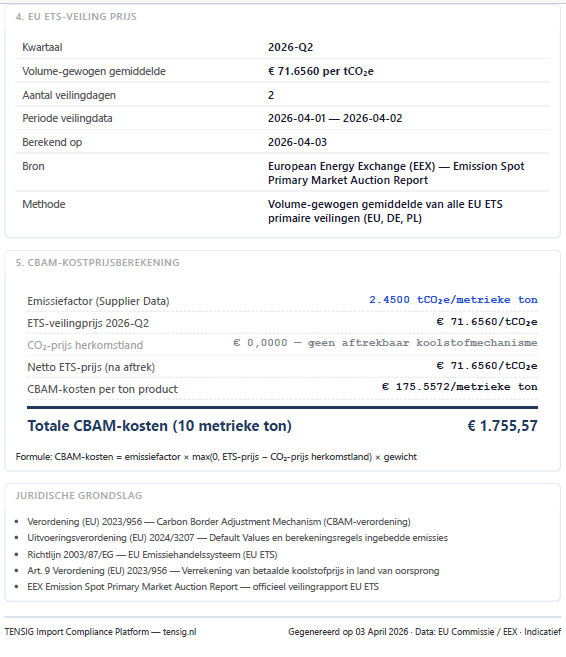
Alleen CBAM-goederenCBAM goods only- check_circleAlles van het Import rapport +Everything from the Import report +
- check_circleCBAM-certificaatstatus: Y128 / Y137 / Y237CBAM certificate status: Y128 / Y137 / Y237
- check_circleEmissiefactor (EU Default of leveranciersfactor) + bronEmission factor (EU Default or supplier factor) + source
- check_circleETS-veilingprijs: kwartaalgemiddelde, periode, Art. 9 aftrekETS auction price: quarterly average, period, Art. 9 deduction
- check_circleCBAM-kosten per ton + totaal op basis van gewichtCBAM cost per tonne + total based on weight
- check_circleRechtsgrondslag Verordening (EU) 2023/956Legal basis Regulation (EU) 2023/956
Knop: "CBAM rapport" in het Rechtsgrondslag-paneel. Verschijnt alleen als CBAM geldt voor de geselecteerde CN8-code en het herkomstland. Button: "CBAM report" in the Legal basis panel. Only appears when CBAM applies to the selected CN8 code and country of origin.
Zo zien de rapporten eruitWhat the reports look like
Import rapportImport report
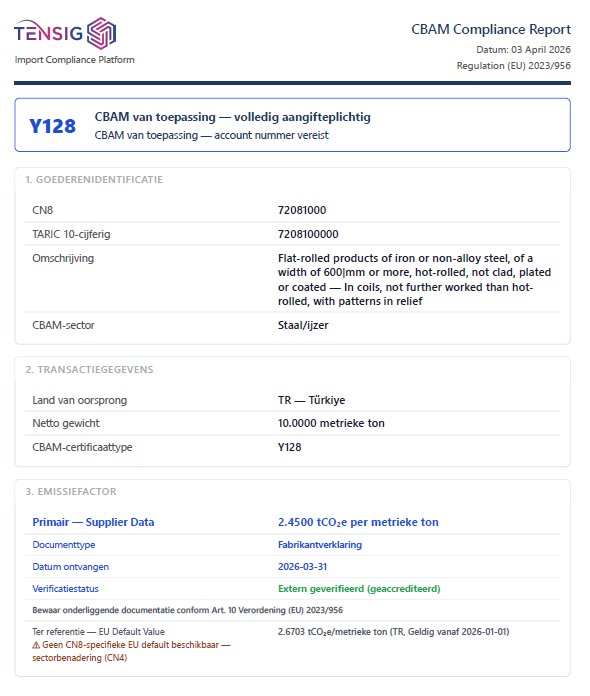
CBAM rapport
De instellingenknop ⚙The settings button ⚙
Het tandwielpictogram rechtsboven opent het instellingenpaneel. Hier stel je in wat de app onthoudt tussen sessies: uitvoermappen, standaardformaten, het bestemmingsland voor BTW en de koppeling met de CBAM Workspace. Alles wordt lokaal opgeslagen in de browser — niets gaat naar een server. The gear icon top right opens the settings panel. Here you configure what the app remembers between sessions: output folders, default formats, the destination country for VAT and the connection to the CBAM Workspace. Everything is stored locally in the browser — nothing is sent to a server.
CBAM Workspace — aan/uitCBAM Workspace — on/off
Schakelt de knop "Opslaan in Workspace" in de app in of uit. Uitschakelen als u de CBAM Workspace niet gebruikt — zo verdwijnen de Workspace-velden uit het scherm en werkt de app als puur tariefopzoeksysteem. Enables or disables the "Save to Workspace" button in the app. Disable if you don't use the CBAM Workspace — this removes Workspace fields from the screen and makes the app a pure tariff lookup tool.
Bestemmingsland (BTW)Destination country (VAT)
Bepaalt het BTW-percentage in de kostprijsberekening. Standaard Nederland (21%). Wijzig dit als u importeert voor een klant in een ander EU-land — elk EU-land heeft een eigen standaard BTW-tarief. Determines the VAT rate in the cost calculation. Default Netherlands (21%). Change this if you import for a client in another EU country — each EU country has its own standard VAT rate.
Import rapport (PDF) — automatischImport report (PDF) — automatic
Als aangevinkt wordt het Import rapport automatisch gegenereerd bij elke Download-actie. Standaard ingeschakeld. Vink uit als u alleen CBAM-rapporten wilt bewaren of de app puur als opzoektool gebruikt zonder archivering. When checked, the Import report is automatically generated with every Download action. Enabled by default. Uncheck if you only want to save CBAM reports or use the app purely as a lookup tool without archiving.
CBAM rapport (PDF) + uitvoermapCBAM report (PDF) + output folder
Als aangevinkt wordt het CBAM rapport automatisch gegenereerd bij Download — maar alleen als CBAM geldt voor het geselecteerde product en herkomstland. Stel ook de uitvoermap in: de PDF wordt via het browser-printvenster opgeslagen op de door u gekozen locatie. When checked, the CBAM report is automatically generated on Download — but only when CBAM applies to the selected product and country. Also set the output folder: the PDF is saved via the browser print window to your chosen location.
CSV — uitvoermapCSV — output folder
Standaard opslaglocatie voor CSV-exports. Het CSV-bestand bevat 23 kolommen met alle berekende waarden — geschikt voor verwerking in Excel. De mapkeuze wordt onthouden totdat u de browser sluit. Default save location for CSV exports. The CSV file contains 23 columns with all calculated values — suitable for processing in Excel. The folder choice is remembered until you close the browser.
JSON — invoer- en uitvoermapJSON — input and output folder
De invoermap is de standaardlocatie van waaruit u JSON-bestanden laadt (bijv. vanuit uw ERP). De uitvoermap is waar JSON-exports worden opgeslagen. JSON bevat het volledige _cbam_volledig-object voor directe verwerking door de CBAM Workspace.
The input folder is the default location from which you load JSON files (e.g. from your ERP). The output folder is where JSON exports are saved. JSON contains the full _cbam_volledig object for direct processing by the CBAM Workspace.
BestandsnaamconventieFilename convention
Alle gedownloade bestanden (PDF, CSV, JSON) volgen dezelfde naamconventie zodat ze chronologisch gesorteerd en eenvoudig gefilterd kunnen worden. All downloaded files (PDF, CSV, JSON) follow the same naming convention so they can be sorted chronologically and easily filtered.
Tijdstempel YYYYMMDDHHmmTimestamp YYYYMMDDHHmm
Vaste prefix — filterbaarFixed prefix — filterable
CN8-code (8 cijfers)CN8 code (8 digits)
ISO-2 landcode herkomstISO-2 country code origin
CSV — 23 kolommenCSV — 23 columns
Separator: puntkomma (;). Codering: UTF-8 met BOM (Excel opent direct). Decimaalteken: komma (NL) of punt (EN). Open via Gegevens → Uit tekst/CSV in Excel — niet dubbelklikken.
Separator: semicolon (;). Encoding: UTF-8 with BOM (Excel opens directly). Decimal: comma (NL) or dot (EN). Open via Data → From Text/CSV in Excel — don't double-click.
| # | KolomnaamColumn name | InhoudContent |
|---|---|---|
| 1 | datum / date | Rapportdatum (dd-mm-jjjj)Report date (dd-mm-yyyy) |
| 2–3 | cn8_code, taric_10 | 8-cijferige CN-code + TARIC-10 subcode8-digit CN code + TARIC-10 subcode |
| 4–6 | omschrijving, land_code, land | Goederenomschrijving, ISO-2 code, volledige landnaamGoods description, ISO-2 code, full country name |
| 7 | netto_gewicht_kg | Ingevoerd gewicht in kilogramEntered weight in kilograms |
| 8–9 | cbam_sector, cbam_certificaat | EU-productcategorie + Y128 / Y137 / Y237EU product category + Y128 / Y137 / Y237 |
| 10–12 | emissiefactor, bron, dv_niveau | tCO₂e/ton, EU Default of Supplier Data, cascadeniveau CN8/CN6/CN4tCO₂e/tonne, EU Default or Supplier Data, cascade level CN8/CN6/CN4 |
| 13–15 | ets_prijs, co2_herkomst, netto_ets | Bruto ETS, Art. 9 aftrek, netto ETS (alles €/tCO₂e)Gross ETS, Art. 9 deduction, net ETS (all €/tCO₂e) |
| 16–17 | kosten_per_ton, totale_kosten | CBAM-kosten per ton (€) + totaal op basis van gewicht (€)CBAM cost per tonne (€) + total based on weight (€) |
| 18–19 | ets_periode, kwartaal | Rolling dagen of kwartaal + kwartaalcode bijv. 2026-Q2Rolling days or quarter + quarter code e.g. 2026-Q2 |
| 20–23 | supplier_* | Leveranciersfactor, verificatiestatus, doctype, meetdatum (leeg als niet ingevuld)Supplier factor, verification status, doc type, measurement date (empty if not entered) |